Figma inserts
The Inserts tab of your team’s Assets lists the inserts that your team sent from Figma. An insert is a layer prepared in Figma and sent with the Cropink plugin. The tab says:
Inserts sent from the Figma plugin, ready to use in Design Manager.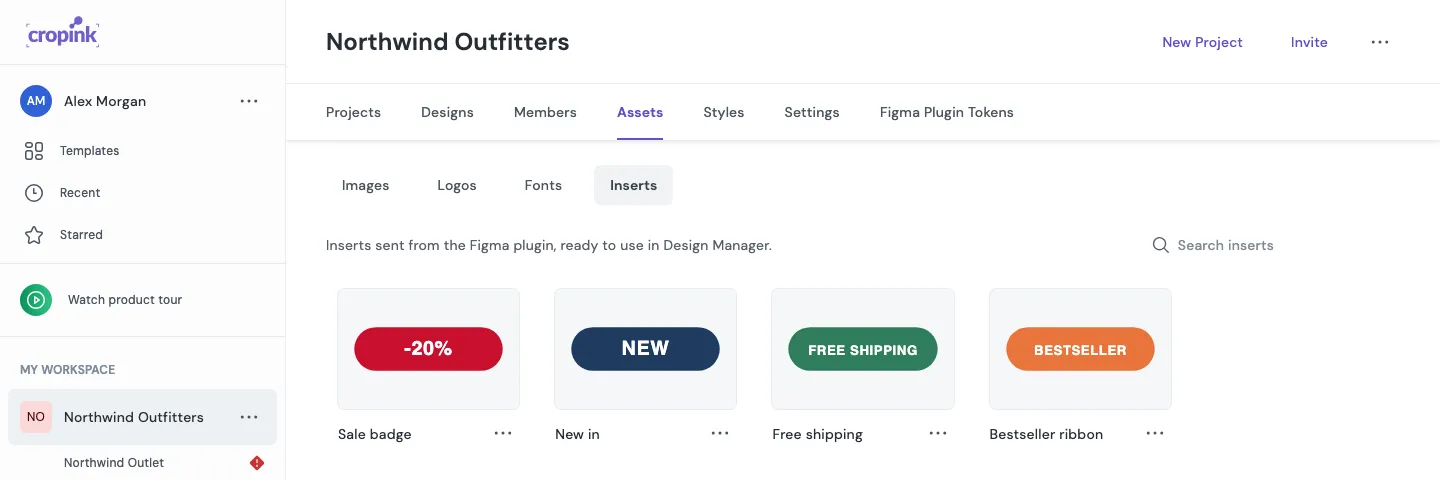
Inserts may not be available on your account. If you do not see the Inserts tab, the feature is not turned on for you.
Send an insert from Figma
Section titled “Send an insert from Figma”You do not add inserts on this screen. Send a layer from Figma with the Cropink plugin, using a team token, and it shows up in the tab. The empty tab says the same: Send a layer from Figma with the Cropink plugin using a team token and it will show up here. See Inserts from Figma.
Find an insert
Section titled “Find an insert”Each tile shows a preview and the name of the insert. Type in Search inserts to filter the tiles by name. If nothing matches, you see a message with your search text; clear the box to see all inserts again.
Use an insert in the design editor
Section titled “Use an insert in the design editor”In the design editor, the Insert panel offers your team’s inserts (and shared ones). The editor shows it only when it is turned on for you; this can differ from the tab here. This tab does not add inserts to designs; it only shows what is available.
Empty tab
Section titled “Empty tab”Until the team sends the first insert, the tab shows No inserts yet.